Agent Teams Module
Generate a complete, coordinated AI agent team for any project — from a single project description file.
What It Does
Given a project description (a .json or .md brief), the module:
- Analyzes the project goal, deliverables, tools, and components
- Selects the right agent archetypes from a 4-tier taxonomy
- Renders all agent files by filling in project-specific placeholders
- Emits ready-to-use agent files for VS Code Copilot, Copilot CLI, Claude, Block / AAIF Goose, or the cross-tool AGENTS.md standard
The generated team includes:
- 1 Orchestrator agent — coordinates all workflows
- 11 Governance agents — navigation, security, code hygiene, consistency, cleanup, refactoring, documentation, cross-repository coordination, conflict resolution, and git operations
- 3–10 Domain agents —
@work-summarizerplus project-appropriate archetypes - 1 Workstream Expert per project component — deep, component-specific knowledge
- 1 Team Builder agent — framework-native agent that can regenerate or expand the team
- A framework instructions file —
.github/copilot-instructions.md(Copilot VS Code / Copilot CLI),.claude/CLAUDE.md(Claude), or a repo-rootAGENTS.md(Goose /agents-md)
Workflow
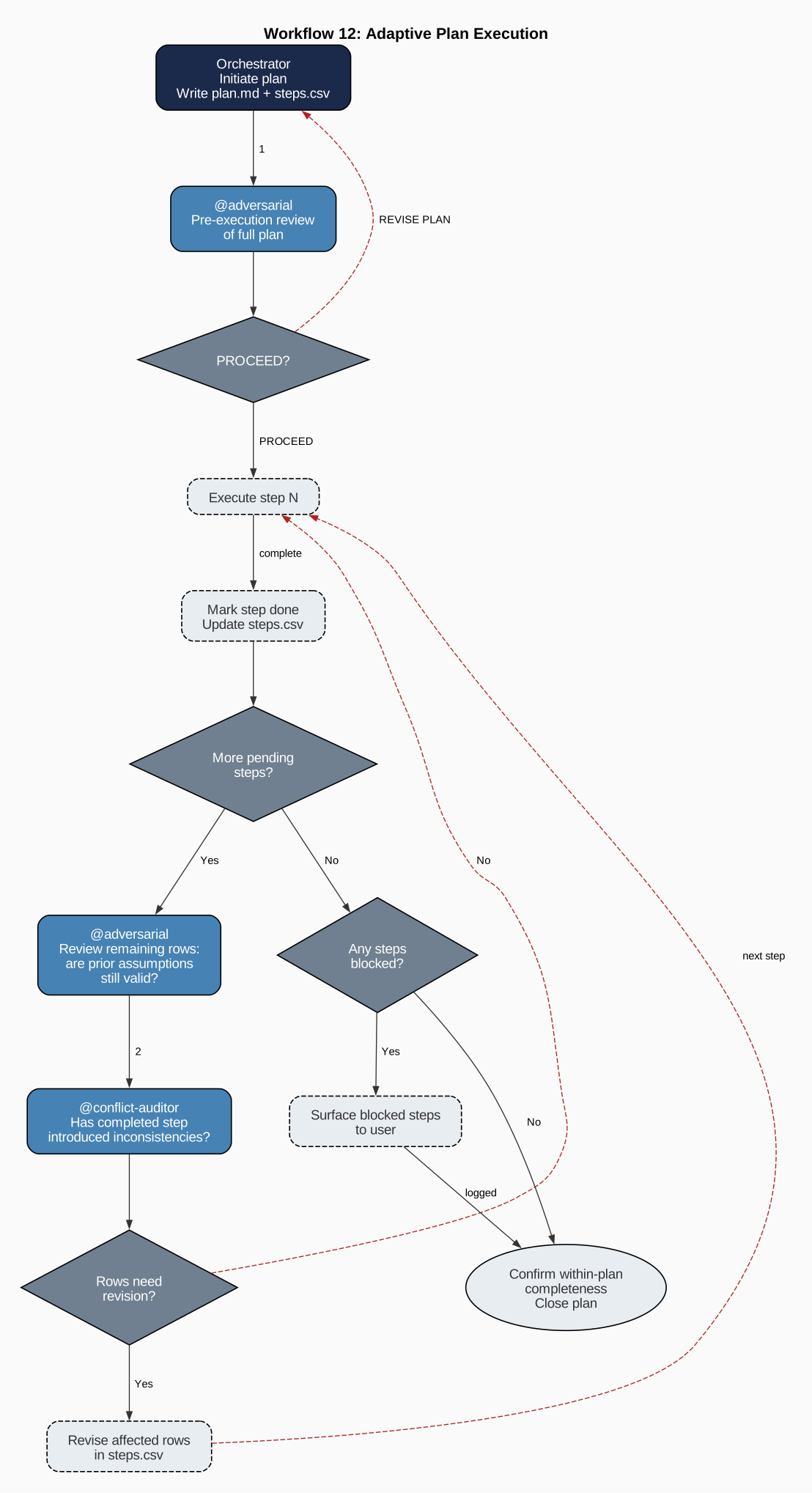
Blog Series: AgentTeams Module Roles and Workflows
Short reads (about five paragraphs each) explaining how core module components fit together:
- Introduction
- Adaptive Workflows with Step-by-Step Auditing and Revision
- Team Builder and Workstream Expert Agents
- Orchestrator Agent
- Functional Agents
- Domain Agents
- Tools and References
- Security Agent
- Audit Protocols and Security
- Regularly Auditing Agent Documentation
- Constitutional Fencing
- Efficient Inter-agent Communication via a Daily Work Summaries Document
Framework Support
| Framework | Format | Handoffs | Builder Agent |
|---|---|---|---|
copilot-vscode |
.agent.md with YAML front matter |
Native inline YAML | VS Code Copilot .agent.md |
copilot-cli |
Plain .md system prompts |
Runtime manifest when handoffs are present (references/runtime-handoffs.json) |
CLI prompt .md |
claude |
Claude front matter .md + CLAUDE.md instructions |
Runtime manifest when handoffs are present (references/runtime-handoffs.json) |
CLAUDE.md system prompt |
goose (beta) |
Block / AAIF Goose recipe YAML (.goose/recipes/*.yaml) |
Native — orchestrator handoffs become sub_recipes, deeper edges become summon load(...) (no sidecar) |
Runnable team-builder.yaml recipe |
agents-md |
Cross-tool AGENTS.md standard (plain .md) |
Routing preserved in references/runtime-handoffs.json |
.agents/team-builder.md |
For copilot-cli, claude, and agents-md, AgentTeams strips inline handoff sections from the visible prompt files but emits references/runtime-handoffs.json when handoffs are extracted, so routing metadata remains available to bridge layers and other runtime tooling. copilot-vscode and goose keep handoff semantics inline (for Goose, encoded directly in the recipes).
Goose support is in beta
Goose support works and is validated against the Goose CLI, but is still maturing: interop into Goose is supported, converting from claude/copilot-cli sources currently yields flat (un-delegated) recipes, and the goose adapter is Beta under the stability policy (its API may change in a minor release). See the framework feature-support matrix.
Goose (--framework goose) emits one recipe per agent plus a team brief at the repo-root AGENTS.md and a .goosehints integrator; the orchestrator delegates to specialist recipes via sub_recipes. It is supported for generate, convert (--convert-from … --framework goose), bridge (--bridge-from … --framework goose) and interop (--interop-from … --framework goose; the canonical interop path keeps the handoff graph).
agents-md (--framework agents-md) emits a single framework-neutral repo-root AGENTS.md — the canonical file read by ~10 AI coding tools (Continue, Cursor, Cline, Codex, Zed, Aider, …) — plus per-specialist detail under .agents/. It is generate-only.
Default framework locations:
- copilot-vscode: .github/agents/
- copilot-cli: .github/copilot/
- claude: .claude/agents/
- goose: .goose/recipes/ (team brief at repo-root AGENTS.md + .goosehints)
- agents-md: .agents/ (canonical brief at repo-root AGENTS.md)
Framework instructions locations:
- copilot-vscode: .github/copilot-instructions.md
- copilot-cli: .github/copilot-instructions.md
- claude: .claude/CLAUDE.md
- goose: repo-root AGENTS.md (+ .goosehints)
- agents-md: repo-root AGENTS.md
Three build paths:
- Path A: fresh generation from a brief (--description)
- Path B: format migration of an existing team (--convert-from)
- Path C: lightweight interface bridge to source canonical agents (--bridge-from)
Interoperability Feature Family
Interoperability is now a first-class capability in AgentTeams with three explicit modes:
- Format migration (
--convert-from) for wrapper/front matter translation while preserving body prose. - CAI interop pipeline (
--interop-from) for canonical normalization and optional compatibility bundles. - Lightweight bridge (
--bridge-from) for source-canonical runtime integration without regenerating all source docs.
Open the dedicated Interoperability tab for mode-by-mode guidance and API links.
Install
AgentTeams is not yet published to PyPI. Install directly from the GitHub repository:
Or clone and install in editable mode for development:
Requires Python 3.11+. One runtime dependency (jsonschema); otherwise stdlib.
Quick Example
See Getting Started for a full walkthrough, Agent-Assisted Setup to use a coding agent to create your team interactively, or CLI Reference for all flags.
In-Depth Guides
Post-Production Auditor Guide
Outcome-verification specialist for domain-agnostic completion checks (software, docs, operations, data). Covers:
- When to use post-production-auditor (contextual automatic selection + manual override)
- Core audit capability (sampling, verdict rules, closure gating)
- Configuration and output artifacts
- Escalation rules and remediation workflows
- Applicability contract and limitations
Best for: Projects with high-impact state changes, migration/release/remediation work, or compliance requirements.
Security Hardening & Threat Intelligence
Comprehensive vulnerability management integrated into every pipeline run. Covers:
- Live threat intelligence feeds (CISA KEV, NVD CVSS, EPSS)
- Fail-closed gating and 24-hour auto-refresh
- Waiver system for offline/air-gapped environments
- CLI flags for security control
- Agent-level vulnerability handling
- Security governance integration
Best for: Security teams, CI/CD maintainers, and air-gapped deployments.
Update Compatibility Maintenance Guide
Infrastructure hygiene practices for keeping generated agent teams continuously compatible with --update over time. Covers:
- Fence coverage checks and legacy retrofit strategy
- Safe merge-mode update invocation patterns
- Outside-fence diff review and backup hygiene
- CI maintenance cadence for early drift detection
- Common compatibility failure modes and fast remediation paths
Best for: Team maintainers, platform engineers, and repository owners responsible for long-lived agent infrastructure.